
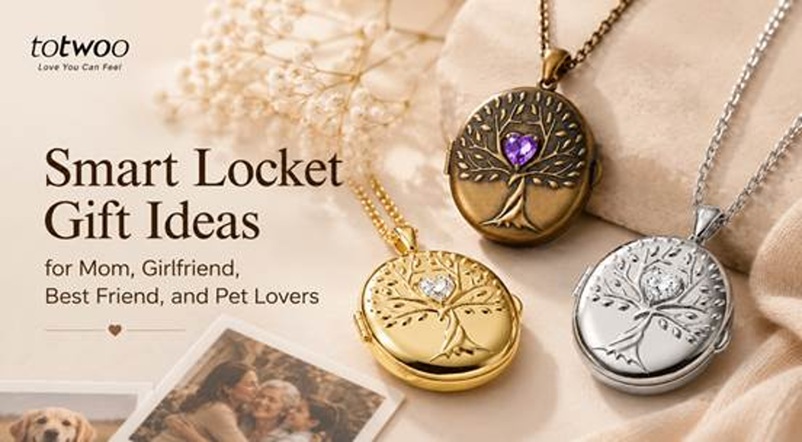
A smart locket becomes personal because of what you place inside it. The pendant provides the format, but the photographs, their order, and the explanation behind them create the gift.
Instead of offering general suggestions such as “add family photos,” this guide provides four ready-to-use content plans. Each one can be adapted for a mother, girlfriend, best friend, or pet owner.
Choose the Memory Mode Before Selecting Content
The current Tree of Life AI Smart Locket supports three different memory modes:
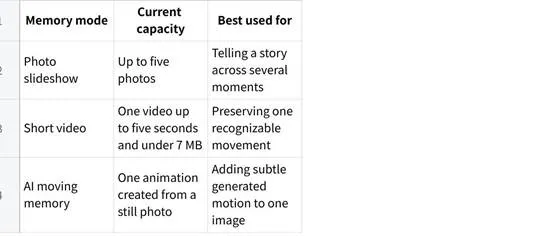
These are alternative modes. The locket does not display five photos, a short video, and an AI animation at the same time.
Choose one format before preparing the gift:
• Select a five-photo slideshow when the story covers several years or milestones.
• Select a short video when one real movement expresses the memory better.
• Select an AI moving memory only when the recipient is comfortable with generated animation.
The Tree of Life design is often associated with family, growth, and continuity, but the selected content should remain the main focus of the gift.
Smart Locket Gift Idea for Mom: A Five-Photo Family Timeline
For Mom, create a short family history rather than choosing five similar portraits. The photographs should show how the relationship has developed.
Five-Photo Plan for Mom
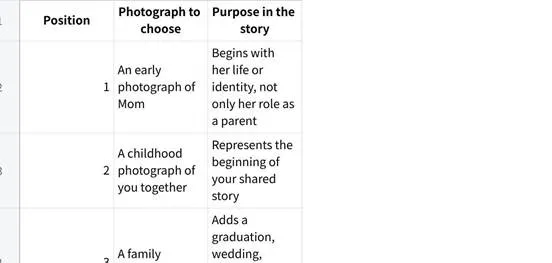
Avoid choosing only formal photographs. A slightly imperfect image from an ordinary family day may bring back more specific memories than five professionally posed portraits.
Alternative Short-Video Idea for Mom
Instead of a slideshow, choose one brief visual moment, such as:
• Family members waving at the camera
• A candle being lit at a birthday
• A child or grandchild running toward her
• A familiar moment around the dinner table
• A brief clip from a family reunion
Confirm how the selected locket handles audio before relying on spoken words. The visual moment should still make sense if viewed without sound.
Note to Include
Explain the order of the photographs:
|
These five pictures show where our family started, how we grew, and the people who are part of your story today. |
That explanation gives the slideshow a clear structure instead of making it look like a random selection from a camera roll.
Smart Locket Gift Idea for a Girlfriend: A Relationship in Five Moments
For a girlfriend, avoid filling the locket with five similar couple selfies. Create a sequence that combines beginnings, milestones, and ordinary moments.
Five-Photo Plan for a Girlfriend
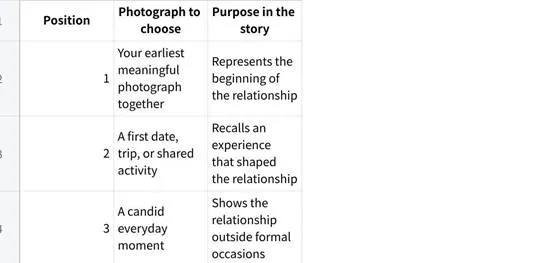
The third photograph is particularly important. A picture of cooking together, waiting at an airport, laughing in the car, or spending a quiet day at home can make the gift feel more specific than a collection of polished romantic images.
Alternative Short-Video Idea for a Girlfriend
Choose one five-second moment that she will immediately recognize:
• Laughing during a trip
• Turning toward the camera at a familiar place
• Dancing at a wedding or celebration
• Watching a sunset together
• A brief reunion moment
Use a private video only when you are confident she would be comfortable carrying it in a wearable device.
Note to Include
|
I chose one moment from the beginning, one from an adventure, one from ordinary life, one milestone, and one that reminds me where we are now. |
This keeps the presentation affectionate without relying on generic romantic wording.
Smart Locket Gift Idea for a Best Friend: A Shared-Life Story
A friendship locket should show what makes the relationship recognizable to the two people involved. Private jokes, unpolished photographs, and ordinary experiences often work better than formal pictures.
This idea is especially suitable for graduation, a friendship anniversary, a move, or the beginning of a new life chapter.
Five-Photo Plan for a Best Friend
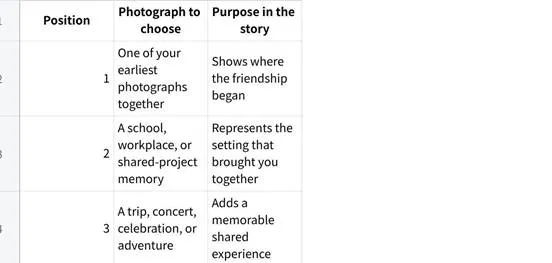
For a friend who is moving away, avoid making every image about departure. Most of the slideshow should celebrate the friendship itself rather than create guilt about leaving.
Alternative Short-Video Idea for a Best Friend
A short clip could show:
• A graduation celebration
• A familiar shared joke
• Dancing at a concert or party
• A road-trip moment
• Both friends waving before a move
Choose a clip that has meaning without requiring a long explanation.
Note to Include
|
These are five versions of us-from where we started to the adventure you’re beginning now. |
The message can acknowledge change while remaining supportive of the friend’s next step.
Smart Locket Gift Idea for a Pet Owner: Five Signs of Personality
A pet locket should preserve the animal’s personality, not simply repeat five similar portraits.
The following plan can be used for a birthday, adoption anniversary, moving-away gift, or personal pet keepsake.
Five-Photo Plan for a Pet Owner
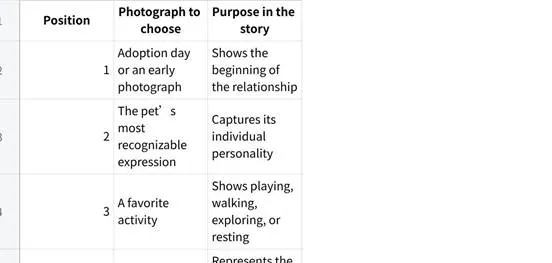
If there is no adoption-day photograph, begin with the earliest clear image available.
Alternative Short-Video Idea for a Pet Owner
Choose one brief, recognizable behavior:
• A dog greeting its owner
• A cat kneading a favorite blanket
• A pet playing with a familiar toy
• A tail wag or head tilt
• A calm moment in a favorite sleeping place
The best clip is not necessarily the most dramatic. A familiar habit may carry more emotional value for the owner.
Special Care With Pet Memorial Gifts
When the pet has died, begin with the recipient’s emotional needs rather than the locket’s available technology.
A peaceful static-photo slideshow is often the safest format. Choose images connected to a happy routine, favorite place, adoption story, or time spent with the owner.
AI moving memories require more caution. The movement is generated from a still photograph; it is a visual interpretation, not a recovery of the pet’s real actions. Some people may find the effect comforting, while others may find it upsetting.
If possible, confirm that the recipient is comfortable with AI animation before using it in a memorial gift. When you cannot ask without revealing the gift, choose static photographs instead.
The same principle applies when creating a locket in memory of a person who has died. Do not surprise someone with an animated image unless you understand how they feel about this type of content.
How to Choose the Best Five Photographs
Five photographs should work together as a small story. Use these selection rules:
Include Different Types of Moments
Combine:
• One beginning
• One important milestone
• One everyday memory
• One image that shows personality
• One recent or concluding photograph
Avoid Near-Duplicate Images
Five photographs from the same event may look attractive but provide limited emotional variety. Unless that event is the entire purpose of the gift, select images from different days or stages.
Check the Crop
The screen inside a locket is much smaller than a phone screen. Images with a clear central subject will usually work better than wide group photographs containing many small faces.
Use the cropping guide in the app to make sure the important person, pet, or detail remains visible.
Prioritize Clear Images
Choose photographs that are:
• Well lit
• In focus
• Easy to recognize at a small size
• Free from distracting backgrounds
• Centered on the main subject
A technically imperfect photograph can still be included when the memory is irreplaceable, but it should remain understandable after cropping.
Respect Other People’s Privacy
Do not upload private, embarrassing, or intimate photographs without considering the recipient’s comfort. A locket is personal, but it can still be opened around other people.
How to Preload the Locket Before Gifting
Preloading prevents the recipient from opening an empty device and immediately having to complete a setup process.
For the current Totwoo model, the general process is:
Charge the locket.
Download and sign in to the Totwoo App.
Connect the pendant through Bluetooth.
Choose one memory mode.
Crop and preview the content.
Transfer it to the locket.
Open the pendant and test the complete playback sequence.
Recharge it before wrapping the gift.
The content is stored locally on the locket after syncing. The wearer can later replace it through the app.
Totwoo also currently provides a “Customize Locket” option for submitting content after ordering when arranging direct delivery. Check the latest instructions before choosing this method.
Presentation Ideas for Each Recipient
The photographs create the story, but the presentation helps the recipient understand it.
For Mom
Number the five memories in a handwritten card and add one sentence about each family moment.
For a Girlfriend
Connect the slideshow to a date, trip, anniversary, or relationship milestone instead of presenting it as a generic romantic necklace.
For a Best Friend
Include a short note about the next chapter, particularly when the gift marks graduation or a move.
For a Pet Owner
Write down the pet’s name, adoption date, favorite habit, or a phrase the owner regularly used. For a memorial gift, keep the message gentle and avoid language that tells the person how they should grieve.
Build the Memory Story Before Choosing the Jewelry
A smart locket gift should begin with a content plan. Decide whether the recipient would prefer a five-photo story, one real video moment, or an AI-generated presentation of a still image.
For Mom, build a family timeline. For a girlfriend, show the relationship’s beginning, milestones, and everyday life. For a best friend, preserve the shared experiences behind the friendship. For a pet owner, focus on the animal’s individual personality and relationship with its person.
Once the content has a clear purpose, the locket stops feeling like an empty electronic product. It becomes a prepared keepsake with a story the recipient can understand as soon as they open it.